One place for your cheat sheets, setlists, and live shows.
Organize your chords and lyrics as a solo player. Build and share setlists with your band. Then go live and stay in sync onstage in real time.
Free to start · Sign up with Google or an email address · No account needed to look around · Built for iPads and phones onstage
Solo players
Every chord and lyric, organized by song
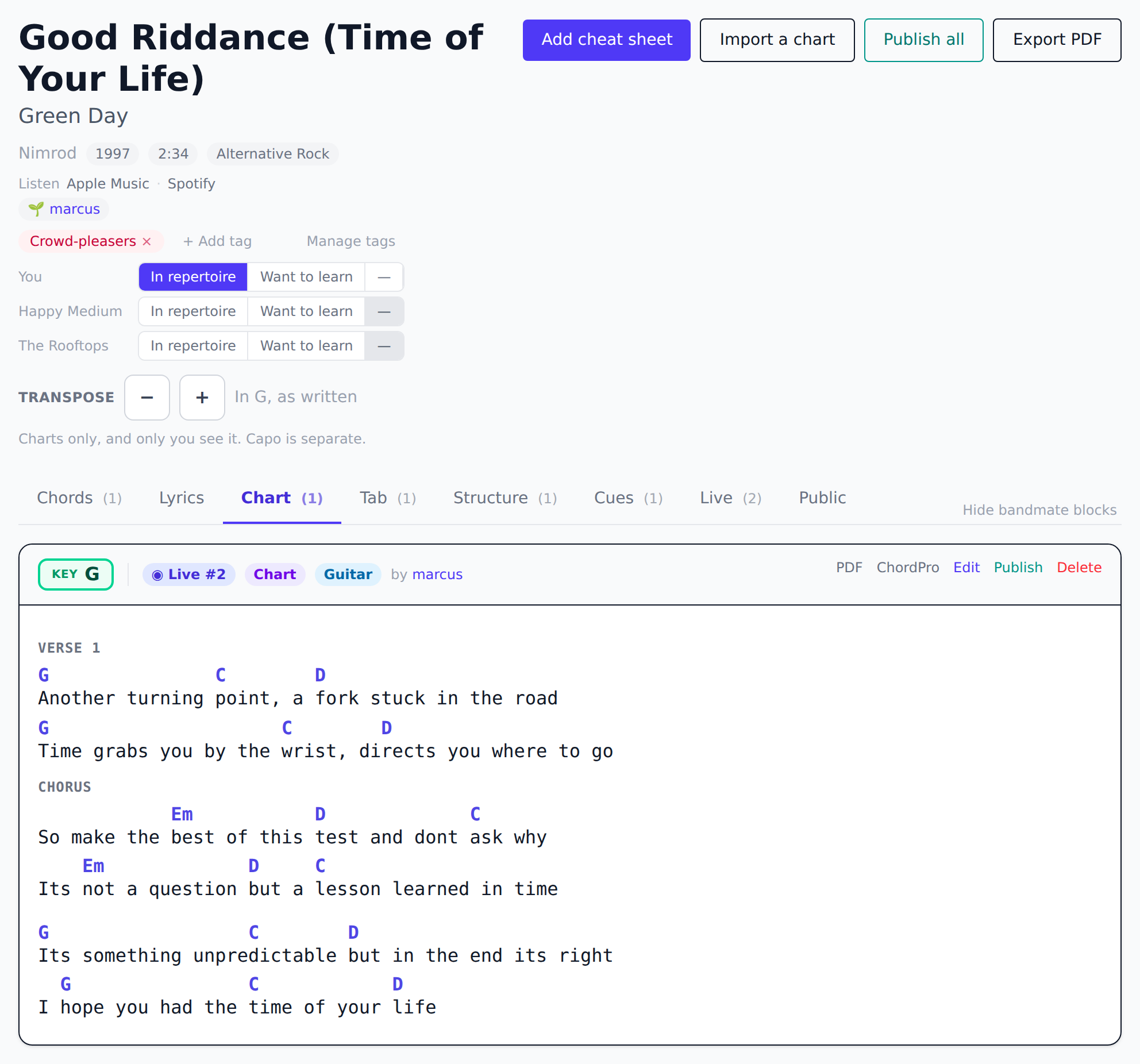
Keep your chords, lyrics, tabs, song structure, and cues in one place, tidied into tabs for each song, with the key and capo on the tab itself. One search box finds a song, a setlist or a band from anywhere in the app. Unlimited songs and cheat sheets, free.
Want the whole song written out? Write it in ChordPro and the chords sit over the syllables they belong to, on stage and on paper. Bring your charts over from another app, or paste one off a chord site and let it work out which lines are chords. Tell it the key and it works out which capo position puts you in open chords, so Eb becomes capo 3 to play in C. Every song links out to Apple Music and Spotify, for when you are still learning it. Free.
Rearrange the tabs to match how you think, and export a personal chart book to PDF for any set. Just your own sheets, ready to print. Premium
Bands
Build the setlist together, once
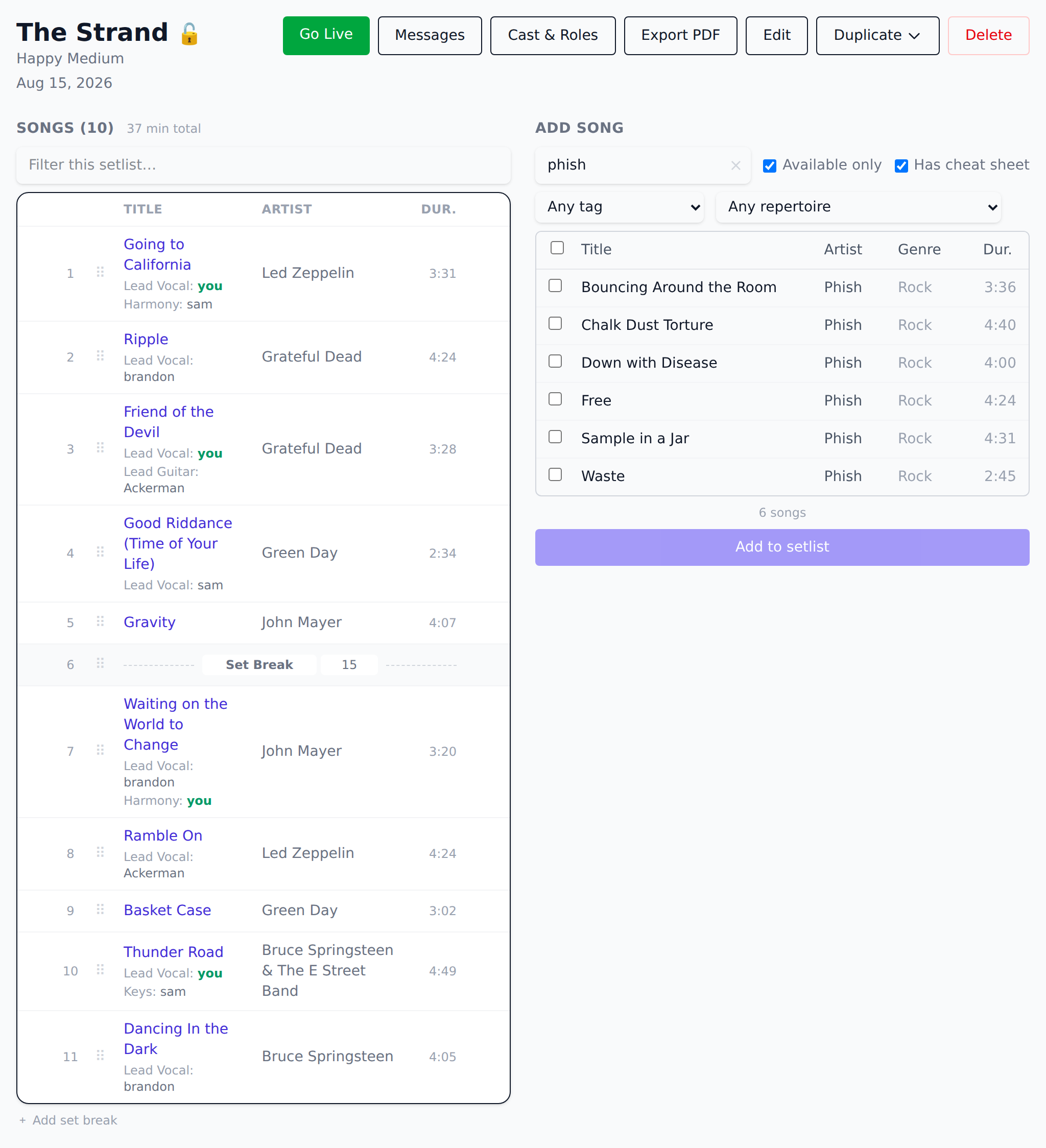
Spin up a setlist with your band, drag to reorder, and drop in set breaks. Everyone's cheat sheets appear side by side, so no one writes out the same chords twice, and the whole band always sees the same running order.
Getting them in takes one link. Share your band's invite code and anyone holding it joins, and from then on any member can build a setlist rather than waiting on whoever set the band up.
Tell it how long the slot is and it counts down as you add songs, and keep the ones you're only carrying below the line: out of the running order and the running time, but a tap away on stage when somebody shouts for one.
Live
Onstage and in sync, at your own pace
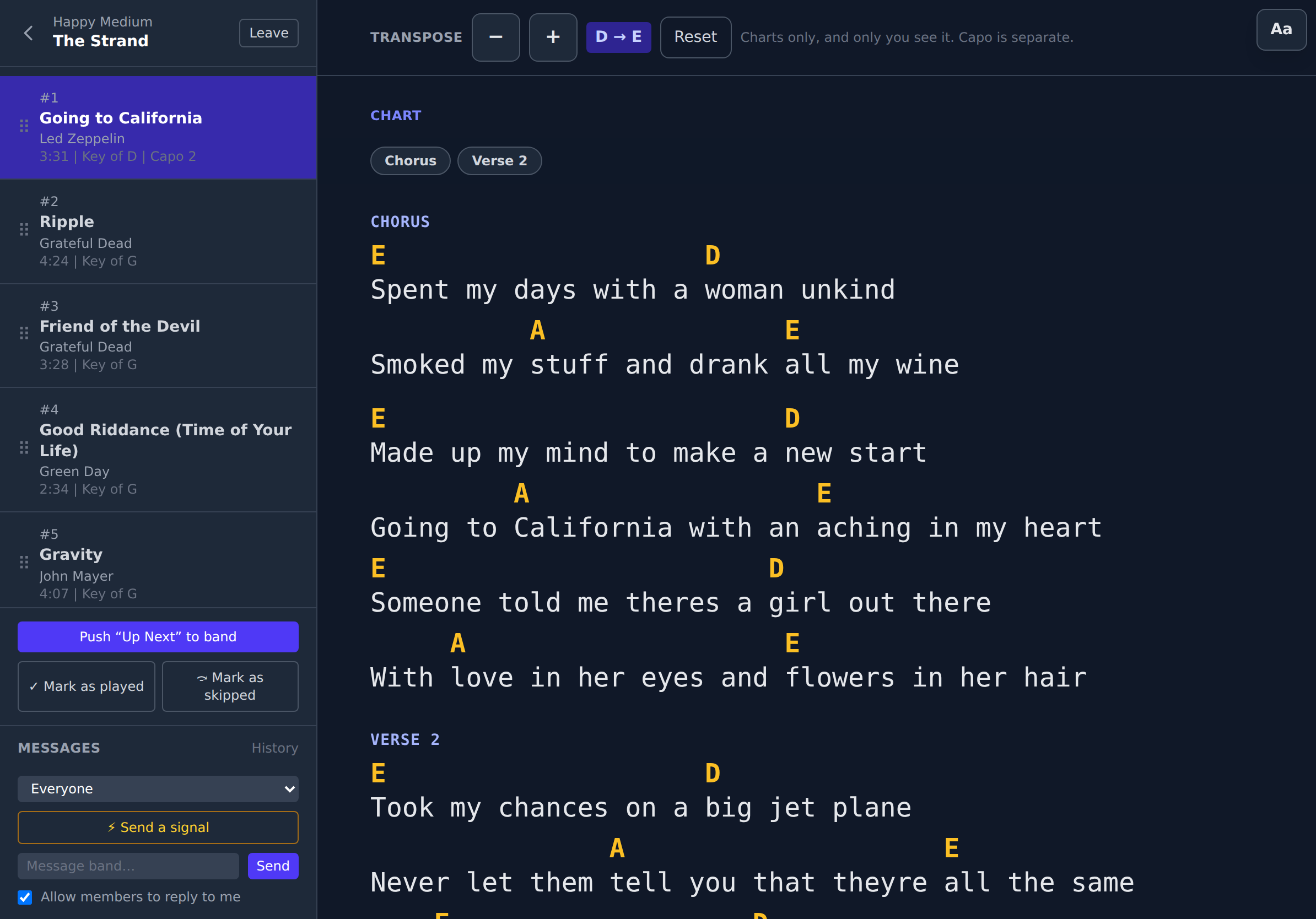
Go live and the whole band follows the same set in real time. The leader flags what's up next in every player's sidebar, while each player's own cheat sheet turns the page only on their own tap. Nobody's chart ever moves because someone else tapped.
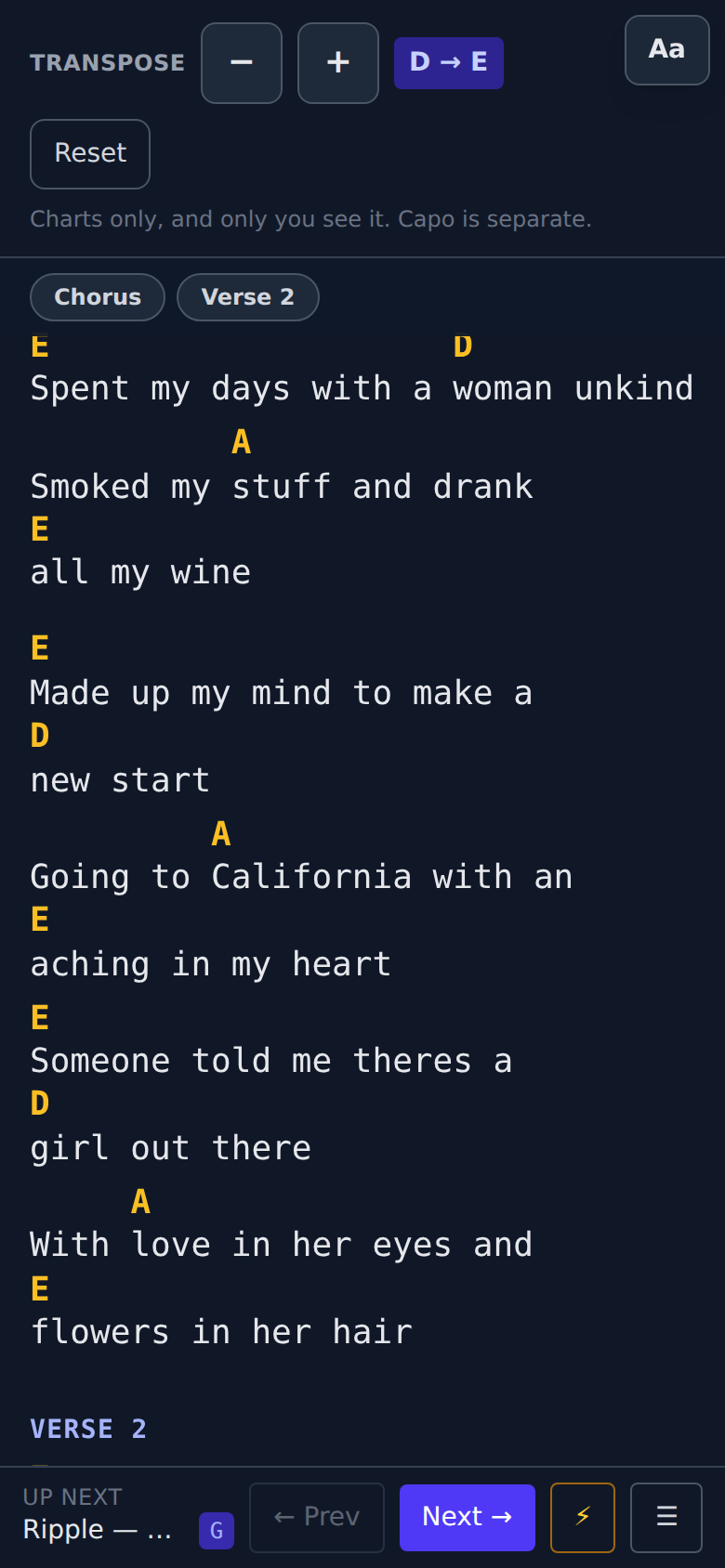
- It survives a real gig. Stage mode keeps the screen awake for the whole set and puts a tap zone down each edge. Set the type as big as you need it from where you stand, run a long sheet in two columns on an iPad, or turn the page with a foot pedal. If a chart has sections, a row of buttons above it jumps straight to the chorus mid-song. Free
- Play it in your key. Move a chart up or down and it moves for you alone: the singer transposes and nobody else's chart shifts, which is the same rule that stops a bandmate's tap turning your page. Nothing you wrote is rewritten, and a chart book you export prints in the key you moved it to and says so. Read in Nashville numbers instead, if that is how you think. Premium
- Who's on what, song by song. Lead vocal, harmonies, who's taking the solo: set the cast on the setlist page and read it onstage. Band
- A set-break countdown everyone shares. The leader starts it in the moment and the same clock ticks down on every screen, so the band comes back together. Band
- Messages between songs. Broadcast to the band or send it to one player, with a 👍 or 👎 back so you know it landed. Or say it in one tap without typing at all: vamp, last chorus, cut it. No shouting across the stage. Band
- Shows and rehearsals, with dates. Mark a setlist as a show or a rehearsal and give it a date, and your setlist list turns into a gig history. Tick songs off as you play them, or mark one skipped when the set runs long. Band
- And afterwards, what you actually play. An analytics dashboard: most-played songs, how long your sets really run, the keys you play in, a dated show history. Built from the setlists you were making anyway, so there's nothing extra to log, and one tap files everything you've played into your repertoire. Your own setlists come with Premium and a band's with the Band tier, so playing solo doesn't mean paying band prices. Premium Band
Off the stage
The gig, not just the set
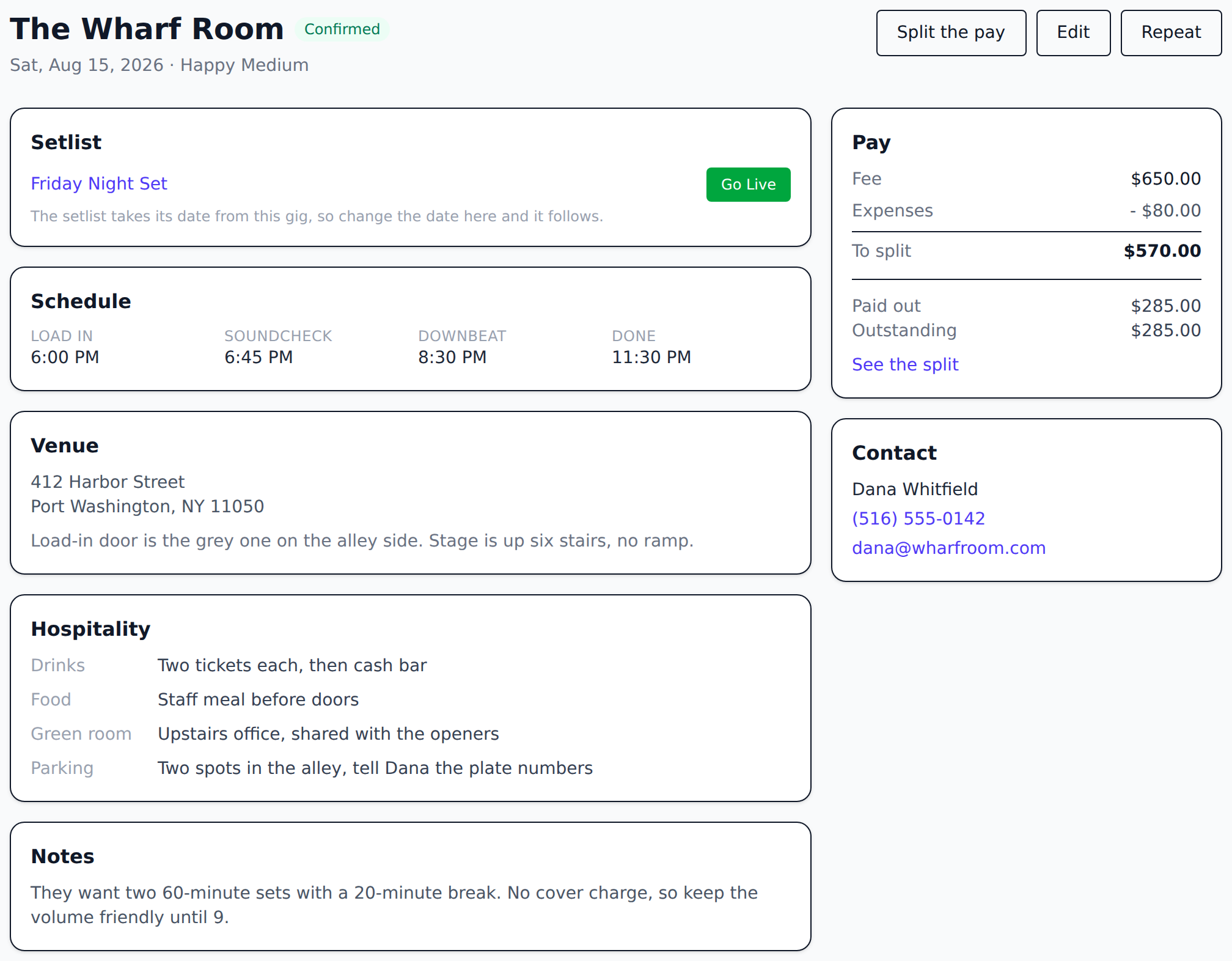
Keep the show itself beside the setlist: the venue and how to get in, load-in and downbeat times, the fee, who to call, and what the rider actually promised. A gig can exist months before there's a set to play, so a date you booked in March is on your dashboard from the day you take it.
For a band, it works out the split too. Even by default, weighted when someone books and drives, with expenses off the top and a flat amount for the sound guy. Tick people off as you pay them. Your own gigs come with Premium and a band's with the Band tier, the same way analytics does. Premium Band
And your band gets a page a fan can open, at a link short enough for an Instagram bio. Your name and logo, where you're from, a short bio, a video, and the dates you choose to announce, with the venue, the city and the downbeat time. Never the fee, the contact or the rider. Add a booking email so somebody can reach you, and publish the songs you play so a booker can check before they ask. It's off until you turn it on, and it's free.
Play on your own? Your profile is that page. Same dates, same video, same song list, same booking link, with no band to invent.
A few more things you'll like
Discover
Browse, rate and copy cheat sheets other players have shared for songs you already play. Or filter whole setlists by the kind of gig (wedding, bar, festival, acoustic) and take one somebody has already proved works. Publishing your own is one click from the sheet itself, or all of a song's sheets at once. Free, both ways, and open without an account.
Built for the stage
Big touch targets and a clean layout made for a music stand, in portrait or landscape. Stage mode keeps the screen awake right through the set, and tells you if the browser will not let it. A page you have already opened comes back even if the venue's wifi drops mid-show.
Real-time sync
The leader's "up next" and any reorder land instantly in everyone's sidebar over a live connection.
It feels like an app
Add it to your home screen and it opens full-screen, no browser chrome. A short walkthrough gets you to your first setlist.
Tags and repertoire
PremiumLabel songs "openers" or "crowd-pleasers", mark songs you already know versus what you're still learning, and filter your library by either.
Take it with you
PremiumCarry or print a personal chart book of any setlist, with just your own cheat sheets. Or a one-page floor sheet in the biggest type that fits, for taping to the monitor. Or export the track list and build a playlist from it wherever you like, or the whole show as ChordPro for any other chart app. Importing is always free.
Ditch the paper setlist.
Free to start. Organize your first cheat sheets in minutes.
The free tier is unlimited setlists, cheat sheets, bands and live sync. Both paid plans start with a 14-day free trial, and either can be bought once instead of monthly.